Ego lite isn’t another automation framework that hacks a browser to make it work with agents. It’s a browser designed from day one for both you and your AI to live in — in separate rooms, doing different things, without stepping on each other’s toes.
I’ve spent the better part of the past year watching engineers fight with browser automation tools. They’d set up Playwright scripts, wrangle Browser-Use, try to get agent-browser from Vercel to cooperate… and every time, the same pattern emerged: the agent would hijack your active tabs, or your logins wouldn’t carry over, or you’d have to run a whole separate browser instance just for the agent. It felt like we were all stuck on a seesaw — either the agent worked, or you did, never both.
Then last month I stumbled on ego lite. And honestly? It’s one of the first tools in this space that made me go, “Oh, that’s how it should work.”
The Problem Nobody Solved Right
Let me paint you a picture. You’re running Claude Code or Codex, and you want it to scrape your LinkedIn messages, cross-reference them with your CRM, and draft replies. With existing tools, the agent fires up a separate Chrome instance — or worse, takes over the one you’re already using. Your login state? Gone. Your cookies? Nope. You have to either re-authenticate everything or accept that the agent will stumble over paywalls and login prompts.
And if you try to multitask — say, have the agent scrape five competitor sites while you’re still reading an article in another tab? Forget it. The agent’s actions collide with your cursor movements. It’s like sharing a single computer with a hyperactive intern who has no spatial awareness.
This isn’t a minor inconvenience. It’s a fundamental design flaw. Most browser automation tools were built as libraries that happen to drive a browser. They never considered that a human might want to use that same browser at the same time. The result? A constant tug-of-war.
One Browser, Two Worlds
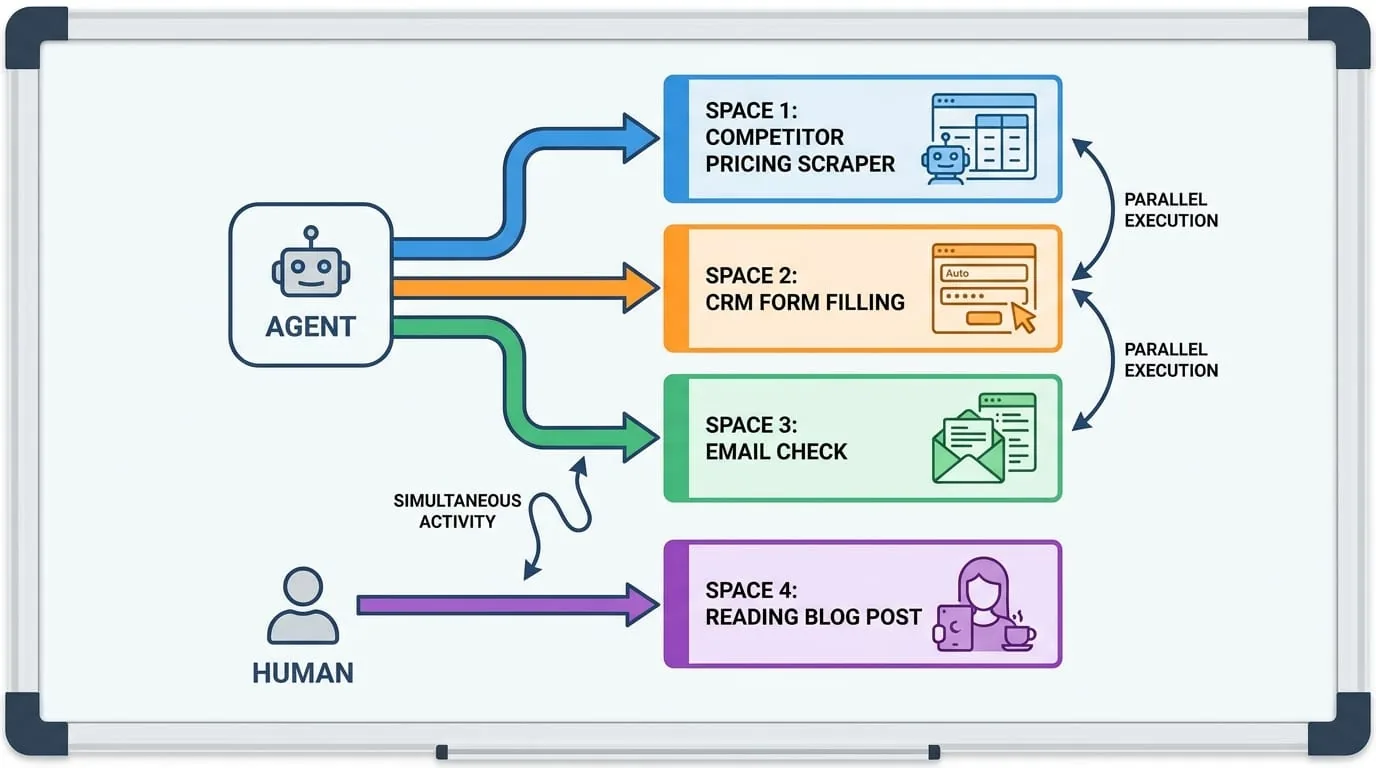
Here’s where ego lite flips the script. It’s a Chromium-based browser — so it feels and works exactly like Chrome. Your extensions, history, bookmarks, and login state all carry over seamlessly. But under the hood, it introduces something called Spaces.
A Space is a fully isolated workspace inside the same browser window. You browse in one Space — call it your “front stage.” The AI agent works in another — the “backstage.” They don’t share tabs. They don’t fight for your mouse. You can see that the agent is running (the Space has a blue glow), click into it to see what it’s doing, or stop it anytime you want.
Think of it like having two separate monitors connected to the same computer — except they’re virtual, inside the same app. The agent never steals your focus. You never lose your place. It’s been working steadily for me: I’ll be reading a documentation page in my Space while the agent processes 10 leads in 10 parallel Spaces. No collisions. No weird tab switches. Just peaceful coexistence.
Code Base, Not CLI Base — Why It Matters
Most tools make the agent interact with the browser through a CLI: call a command, wait for output, call another command. This is slow. Every round trip costs tokens and latency. And complex tasks that require multiple steps — like filling a form, checking validation, then submitting — get painfully chatty.
Ego lite takes a different approach. The capabilities it exposes to the agent are wrapped as JavaScript functions that the agent calls directly in a single snippet. So instead of issuing ten separate commands, the agent writes one JavaScript block that composes snapshot, fill, click, wait, navigate, and capture into a single execution pass.
In a comparison covering four complex browser automation tasks, ego lite was reported to finish up to 2.5x faster than Vercel’s agent-browser, with fewer tokens. The result may vary by task, browser version, model, and network conditions.
And it’s not just raw speed. By reducing the number of tool calls, the agent is less likely to get confused, hallucinate, or lose context. Single-pass execution means the model sees the full picture in one shot, not a disjointed sequence of steps.
The Snapshot That Doesn’t Break on Nested Iframes
Here’s a dirty secret about most page snapshots (the text representation that models use to “see” a webpage): they fall apart on complex layouts. Deeply nested iframes, shadow DOM elements, dynamic content loaded after the initial render… all of these can break the model’s understanding, leading to bizarre decisions like clicking the wrong button or missing a form field entirely.
In my testing, Ego lite’s snapshot, helped by its kernel-level customization, was among the more robust implementations I’ve seen. It handles nested iframes, infinite scroll, and single-page app routers without flinching. During my testing, I asked it to navigate a bank’s online portal — a notorious maze of iframes and async forms — and it correctly identified every element. I did not see another tool I tried manage that on the first try.
This matters because the snapshot quality directly determines how reliably the agent can act on a page. If the model can’t “see” properly, it can’t do its job. Ego lite’s investment in snapshot fidelity pays off in fewer errors and less retrying.
You Bring Your Agents, I Bring the Browser
One of the most annoying things about “AI browsers” like ChatGPT Atlas or Perplexity Comet is that they come with a built-in agent — and only that agent can drive the browser. You’re locked into their ecosystem. Want to use Claude Code? Too bad. Want to script something with Cursor? Not happening.
Ego lite is the opposite. It exposes a connection layer called ego-browser that any agent CLI can use — Claude Code, Codex, Cursor, even a custom agent you wrote. The skill is automatically installed into ~/.agents/skills and ~/.claude/skills/ when you set up ego lite. To use it, you simply type:
/ego-browser follow @ego_agent on x.com for me
The agent picks up the skill, opens a Space, does its thing, and reports back. That’s it. No extra configuration. No proprietary agent required.
For power users, there’s even a js() context that gives raw CDP access — if you want to drop down to the metal, you can. But for 95% of tasks, the high-level tools are enough.
The Extensions, Cookies, and Logins Just Work
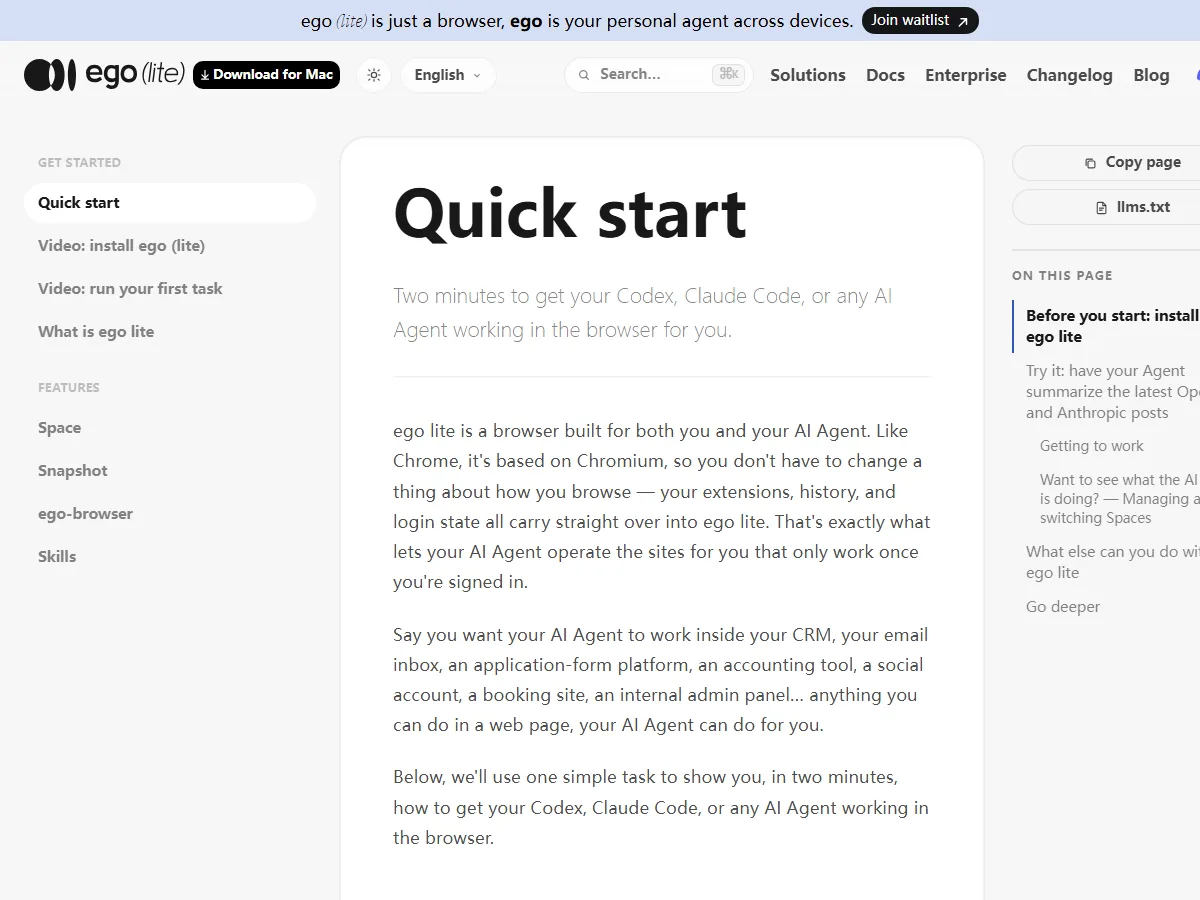
This is the killer feature that no one talks about enough. On first launch, ego lite asks you one question: “Migrate your Chrome data?” Say yes, and everything — your login state, cookies, extensions, bookmarks, profile — is carried over. The agent inherits your authenticated sessions.
Think about what this unlocks. You can ask the agent to do tasks that require being signed in: manage your HubSpot pipeline, pull reports from Google Analytics 4, check your Stripe dashboard, update a Linear issue, or even book a flight on a travel site that requires login. No more “please log in” errors. The agent just walks through the front door.
This is something browser automation frameworks like Browser-Use and agent-browser simply can’t do well. They ship no browser of their own, so they need to drive a separate instance — and logins rarely carry cleanly. You end up having to manually export cookies or script authentication flows. With ego lite, it’s frictionless from the start.
Experience Accumulation: The Next Frontier (Coming Soon)
Here’s the feature I’m most excited about — even though it’s still marked “coming soon.” Ego lite plans to distill every successful action your agent completes into reusable tools and workflows. Over time, similar tasks could run up to 5x faster in the project’s planned workflows because the agent learns from past successes instead of starting from scratch each time.
This is the holy grail of agent automation. Right now, every time an agent scrapes a site, it has to figure out the page structure, guess the selectors, handle errors, and retry. Experience accumulation means the system remembers what worked — the path, the prompts, the edge cases — and reuses that knowledge. It’s like having a memory for your agent.
If they pull this off, ego lite won’t just be a browser. It’ll be a learning platform for AI agents.
What Can You Actually Do With It?
The official docs list a bunch of use cases, and I’ve tried most of them:
- Social media management: Reply to tweets, schedule posts, scrape engagement data from X, LinkedIn, Reddit, Instagram. Works great because it inherits your login session.
- Job hunting: Auto-fill applications on LinkedIn, Wellfound, and YC startup jobs, upload your résumé, even stop before final submit to let you double-check.
- Real estate: Filter Zillow and Redfin listings by your criteria, run mortgage calculators, dump structured data into a Markdown file.
- SaaS back ends: Pull reports from HubSpot, Salesforce, Airtable, Linear, GA4, Search Console, Mixpanel — all without an API key. Just log in once and let the agent do the clicks.
- Internal tools: Your own admin panel, staging environments, QA flows. Anything locked behind a corporate login that other tools can’t reach.
The common thread? Any task that requires a login but isn’t accessible through an open API is exactly where ego lite shines. It’s basically a universal “auto-clicker for authenticated pages” — but with AI that can understand context and adapt.
How It Compares (Spoiler: It’s Not Close)
Let me give you my honest take on the competition:
- Browser-Use and agent-browser (Vercel): Solid automation frameworks, but they’re libraries, not browsers. They need a separate browser to drive, logins rarely carry, and you can’t use the same browser while the agent runs. They’re good for batch tasks on a clean machine. Not great for daily use.
- ChatGPT Atlas and Perplexity Comet: They ship a built-in agent and a built-in browser — but only that agent works. You’re locked in. And they don’t support parallel multi-agent execution. Atlas is nice for simple queries, but forget complex workflows.
- Ego lite: One browser. Your agents, your choice. Parallel Spaces, logins inherited, code-base execution, high-quality snapshots, and local data storage. The only tradeoff right now is macOS-only (Windows and Linux on the roadmap).
I won’t pretend ego lite is perfect. It’s still early — the “experience accumulation” feature isn’t here yet, Windows users are waiting, and the documentation could use more tutorials for custom agent setups. But the core design is right.
Final Thoughts: This Is the Browser I’ve Been Waiting For
I’ve been using ego lite as my daily browser for two weeks now. I haven’t opened regular Chrome once. Not because ego lite has all of Chrome’s extensions (it does, actually, thanks to Chromium), but because having an agent that can work next to me without interrupting my flow is a game-changer.
The moment that sealed it for me: I was in a call, sharing my screen to debug a tricky frontend issue. While I was explaining, I realized I needed to check the latest Stripe event logs. Instead of stopping the call, I typed /ego-browser open stripe dashboard and show me the latest 10 events into my local terminal. A few seconds later, the agent had opened a Space, navigated to Stripe, pulled the logs, and pasted them into the terminal. I just flipped my focus to the terminal, grabbed the data, and kept talking. My colleague didn’t even notice.
That’s the promise of ego lite: not a tool you fight with, but a partner that works quietly in the background, making you faster without getting in your way.
Give it a shot. Download the macOS app, say yes to the Chrome migration, and then ask your agent to do something that’s been annoying you — scrape a login-gated page, fill out a form, or just summarize your unread emails. I think you’ll feel the same click I did.