The numbers shouldn’t add up. Kimi K3 — the largest open-source model released to date — carries 2.8 trillion parameters, and its raw checkpoint weighs 1.56 terabytes. Running it the conventional way demands a server rack, a stack of expensive GPUs, and a power bill that deserves its own line item. By all logic, a single consumer graphics card shouldn’t even be able to look at that model, let alone generate tokens from it.
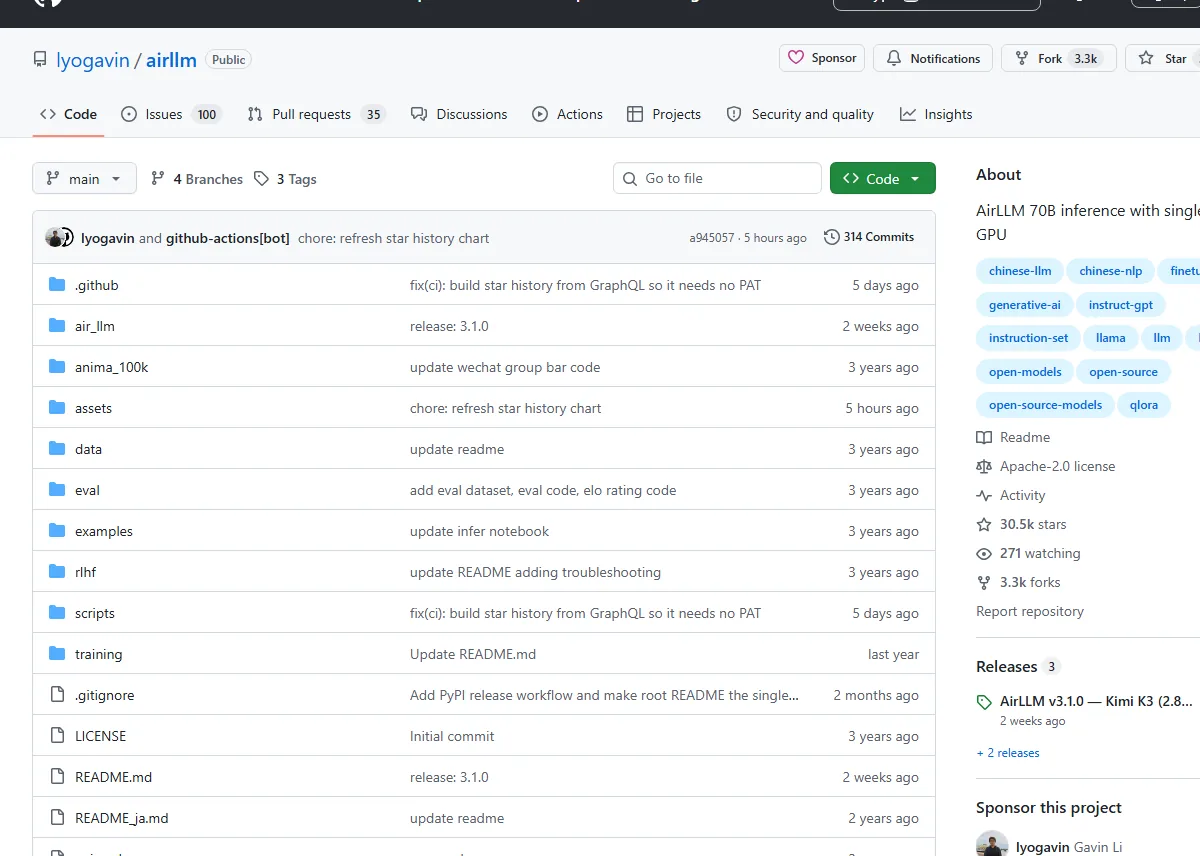
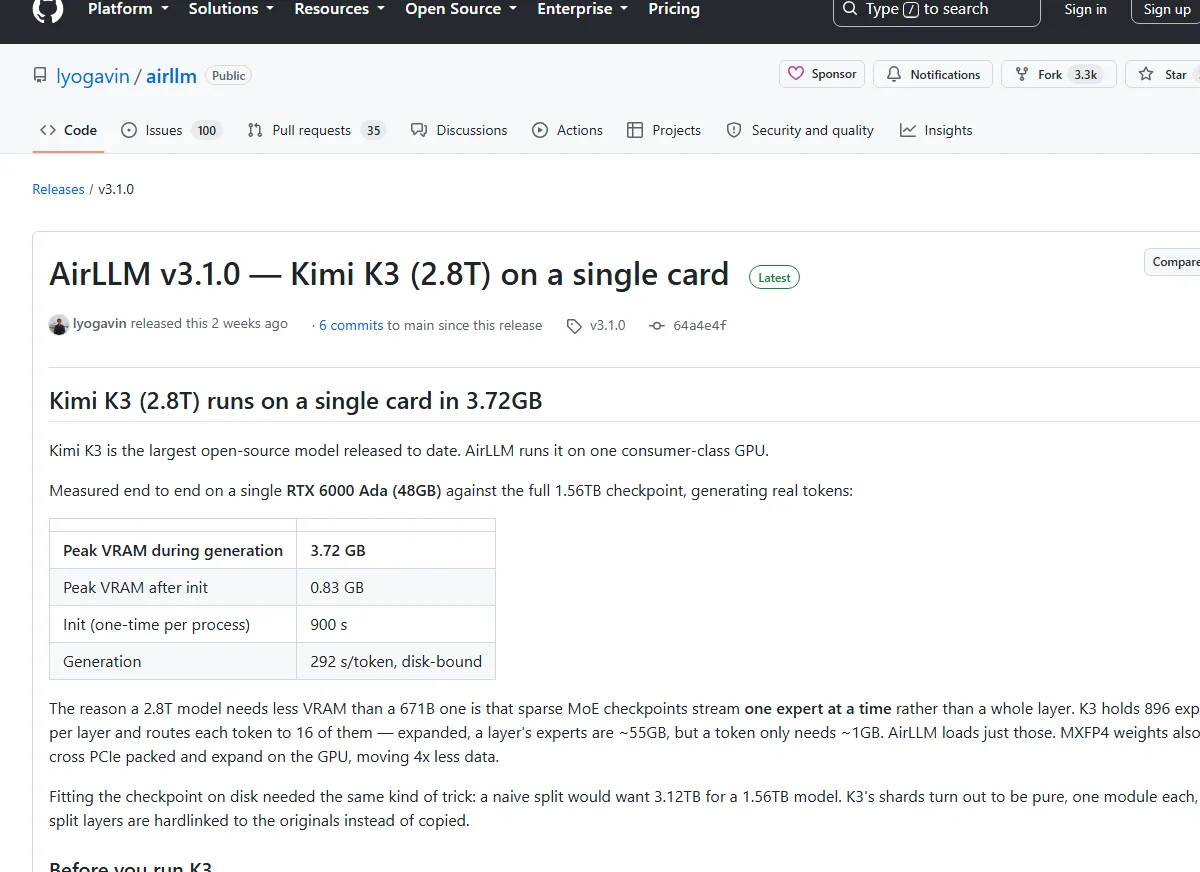
So when I read the v3.1.0 release notes for AirLLM claiming K3 runs on one card at 3.72GB peak VRAM, I did what any reasonably skeptical person would do. I checked the math twice. Then I stared at my own 4GB GPU like it owed me money. Because the claim is real — measured end to end on a single RTX 6000 Ada, against the full 1.56TB checkpoint, generating actual tokens. Peak VRAM during generation: 3.72GB. With a decimal point.
AirLLM has been pulling off this kind of magic trick since late 2023. It’s an open-source inference library by Gavin Li, sitting north of 30,000 stars on GitHub, and its core promise hasn’t changed: run 70B-class language models on a single 4GB GPU card — no quantization, no distillation, no pruning. Just a genuinely clever approach to moving data around. Last month’s release turned that promise up to eleven.
[IMAGE: A consumer GPU card beside a diagram showing model layers streaming through it one at a time]
The trick: one layer at a time
Here’s the mental model most of us carry around: to run a model, you load the whole thing into VRAM. Seventy billion parameters at 16-bit precision? That’s roughly 140GB. On a 4GB card, game over before you even finish downloading the weights.
AirLLM simply refuses to play that game. Instead of loading the entire network, it keeps exactly one layer of the model on the GPU at a time — processes it, shuttles it out, pulls in the next one. The GPU becomes a small workshop handling one piece of the assembly line rather than warehousing the whole factory. The immediate consequence: the VRAM you need depends on the size of your largest layer, not the size of the model. That single insight collapses the hardware barrier in a way that no amount of clever quantization ever managed on its own.
Sparse MoE models make the trick even more absurd. Instead of streaming a whole layer, AirLLM streams only the experts a token actually routes to. That’s why the memory footprint barely moves as models balloon: a dense 70B Llama 3.x needs about 4GB, DeepSeek-V3 — all 671B of it — fits in roughly 12GB, and Qwen3-235B squeezes into around 3GB. Model size doubles, triples, grows by an order of magnitude, and the VRAM requirement just shrugs.
Kimi K3: 2.8 trillion parameters, 3.72GB of VRAM
The K3 release deserves a closer look, because the details are genuinely bonkers.
K3 holds 896 experts per layer. Every token routes to exactly 16 of them. If you expanded a full layer’s experts into memory, you’d need roughly 55GB — but a single token only touches about 1GB of that. AirLLM loads precisely those experts, on demand, as tokens actually route to them. That per-expert streaming is the entire secret behind the 3.72GB number. It’s not compression. It’s not approximation. It’s just refusing to materialize data nobody asked for.
The supporting tricks are quieter but just as important. K3’s weights are MXFP4, and AirLLM ships them across PCIe packed, only expanding them on the GPU — so 4x less data travels over the bus. And on disk, a naive split of a 1.56TB checkpoint would need 3.12TB of free space. Because K3’s shards happen to be cleanly separated into individual modules, AirLLM hardlinks the split layers to the originals instead of copying them. No duplication. No wasted terabytes. That’s the kind of pragmatic engineering I can’t help but admire.
Now the caveats, because I refuse to sugarcoat. Measured end to end, initialization takes 900 seconds, and generation runs at roughly 292 seconds per token — the bottleneck being disk, not compute. Yes, you read that right. Almost five minutes per token. This is a marvel of engineering, not a production inference server. You won’t be building a chatbot on it. But the fact that “completely impractical, yet technically real” is the harshest thing I can say about running a 2.8T model on a single card says a lot about how far this project has come.
K3 also drags in three non-negotiable prerequisites of its own: you’ll need compressed-tensors and flash-attn installed — K3’s model code forces flash attention regardless of what you request — plus a CUDA 12 build of PyTorch, because no prebuilt flash-attn wheel exists for CUDA 13 yet, and transformers 4.56.x, since K3’s remote code won’t load on the 5.x line. Painful, sure. But documented up front, which is more than most projects offer.
Using AirLLM is almost suspiciously easy
Here’s what keeps pulling me back to this project: the API is boring in the best possible way. Install the package, pass a Hugging Face repo ID to AutoModel.from_pretrained(), and you’re done. Same code path whether you’re running an 8B model or something two orders of magnitude bigger.
from airllm import AutoModel

MAX_LENGTH = 128

# just pass a hugging face repo id — works with almost any popular model:
model = AutoModel.from_pretrained("Qwen/Qwen3-32B")

# go bigger with the exact same one line:
# model = AutoModel.from_pretrained("Qwen/Qwen3-235B-A22B")   # 235B, runs in ~3GB
# model = AutoModel.from_pretrained("deepseek-ai/DeepSeek-V3") # 671B, runs in ~12GB

input_text = ['What is the capital of United States?']
input_tokens = model.tokenizer(
    input_text,
    return_tensors="pt",
    return_attention_mask=False,
    truncation=True,
    max_length=MAX_LENGTH,
    padding=False
)

generation_output = model.generate(
    input_tokens['input_ids'].cuda(),
    max_new_tokens=20,
    use_cache=True,
    return_dict_in_generate=True
)

output = model.tokenizer.decode(generation_output.sequences[0])
print(output)
The configuration surface is equally straightforward. compression accepts '4bit' or '8bit' for block-wise quantization, which the project claims delivers up to 3x faster inference with almost negligible accuracy loss. profiling_mode dumps timing breakdowns. hf_token handles gated models. prefetching — on by default — overlaps model loading with compute for a solid 10% speed bump. And delete_original reclaims half your disk by removing the source weights once the transformed layers exist.
What I appreciate most is the design philosophy behind the compression. Most quantization schemes quantize both weights and activations to speed up compute, which makes accuracy hard to control. AirLLM’s bottleneck is disk loading, so it only quantizes weights. Simpler, safer, and exactly the right trade-off for its use case. That’s the mark of a project that understands its own constraints.
What you can actually run
The supported model list has grown into an alphabetical tour of everything that matters in open-source AI. Llama 2/3/3.1/3.3/4. Qwen 1/2/2.5/3, including MoE and FP8 variants. DeepSeek V2/V3/R1. Mistral, Mixtral, Phi, Gemma, ChatGLM, Baichuan, InternLM, Yi. The AutoModel wrapper sniffs out the architecture for you, so in most cases it genuinely is one line of code, and the project has kept pace with new releases — FP8 support and the latest models landed in v3.0 back in June, CPU inference came in v2.10.1, and MacOS (Apple silicon) has been supported since v2.8.2.
The community’s own numbers tell the story better than I ever could:
| Model | Size | GPU VRAM |
|---|---|---|
| Qwen3 / Mistral / Phi (≈8B) | 8B | ~1–2 GB |
| Qwen3-30B / Mixtral (MoE) | 30–47B | ~1–3 GB |
| Qwen3-235B (MoE) | 235B | ~3 GB |
| Llama 3.x 70B (full precision) | 70B | ~4 GB |
| Llama 3.1 405B | 405B | ~8 GB |
| DeepSeek-V3 | 671B | ~12 GB |
Look at that table for a second. 235 billion parameters in 3GB. 671 billion in 12GB. The model sizes keep multiplying and the VRAM requirement barely arches an eyebrow. This isn’t optimization — it’s a different law of physics.
The fine print: disk, tokens, and patience
Every project has sharp edges, and AirLLM’s mostly involve storage. Transforming a model into its layer-wise format is disk-hungry — the most common error in the FAQ, MetadataIncompleteBuffer, usually means you ran out of space mid-split. My advice: check your free disk before you start, not after. If space is tight, delete_original exists for exactly this reason, halving the footprint by keeping only the transformed layers.
Two other gotchas worth knowing. Gated models like the Llama 2 family need a Hugging Face token passed via hf_token. And some tokenizers lack a padding token entirely — if you hit a ValueError about padding, simply set padding=False in your tokenizer call, which the README helpfully suggests.
None of this is disqualifying. It’s just the texture of a project that prioritizes capability over polish, and honestly, I find that refreshing.
Why this matters
I keep coming back to one number: 3.72GB. It reframes the entire conversation about who gets to touch frontier models. The gap between “can run” and “runs fast” is still enormous — five minutes per token is not a vibe — but the gap that actually gates access is between “can’t run at all” and “can run, slowly, on the GPU you already own.”
AirLLM doesn’t make a 2.8T model practical. It makes it reachable. And reachability is where every meaningful democratization story in tech begins. The person who tinkers with K3 at 292 seconds per token on a secondhand graphics card is the same person who’ll write the paper, ship the product, or build the tool that makes it fast. Every revolution needs its awkward first steps.
Your 4GB GPU just got a promotion. Go see what it can do.